Solitaire Pocket: Quick Play
PlayMintBoard
4.59.00 Reviews
- Version
- 1.0.16
- Installs
- 10.00K
- Age Rating
- Everyone
Screenshots
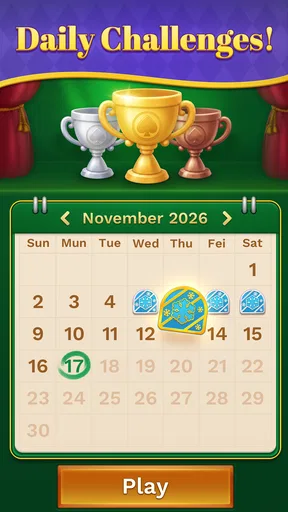

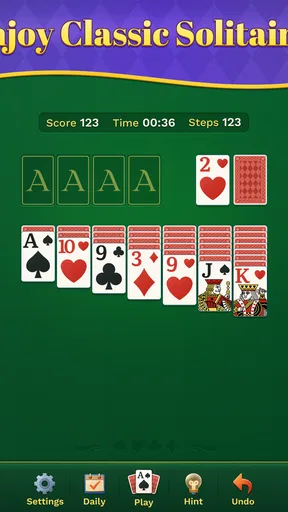
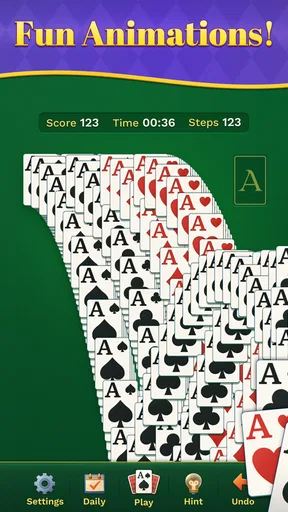
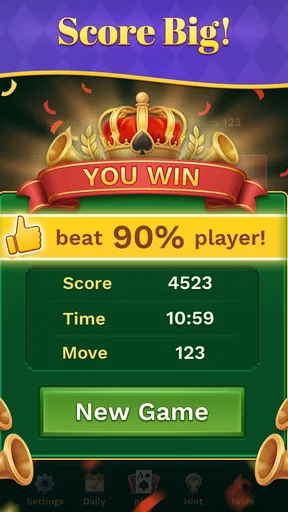
Our Review of Solitaire Pocket: Quick Play
 Analysis by Appyee
I spent time with Solitaire Pocket: Quick Play as the kind of game you open when you have a few quiet minutes rather than a whole evening to fill. It is a free board game from PlayMint built around the familiar Klondike version of solitaire, and its strongest quality is that it gets to the card table without asking for much commitment. The basic appeal is immediate: start a hand, make a few decisions, and close the game whenever real life interrupts.
That simplicity is also the main question for a long-term review. A quick solitaire game can be useful for months if it feels comfortable and dependable, but it can also become repetitive once the first-week novelty disappears. In my experience, this title earns attention from people who want a straightforward card break, not from players searching for a deep progression system or a constantly changing challenge. The important distinction is whether you value a clean routine more than a large amount of content.
What the first week feels like
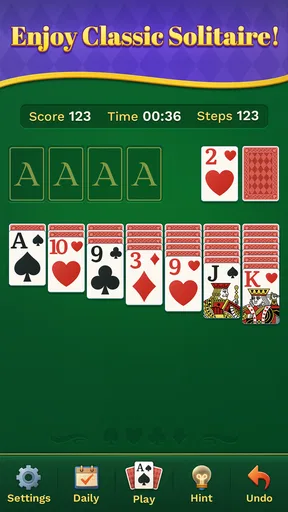
The first sessions are easy to understand because Klondike already has a familiar rhythm. I can look over the layout, uncover hidden cards, move cards into sequence, and gradually build the four suits. There is no need to learn a new ruleset before enjoying the game. That makes it a comfortable choice for someone returning to solitaire after a long break, as well as for a casual player who wants something recognizable.
The quick-play focus suits short gaps in the day. I can imagine using it while waiting for an appointment, taking a short break from work, or winding down before sleep. A hand has enough decision-making to keep my attention, but it does not demand the preparation or concentration of a larger board game. The game’s value comes from fitting neatly into those small spaces rather than trying to dominate them.
For a new player, the most useful early habit is to slow down before making the first obvious move. In Klondike, exposing a hidden card is often more valuable than immediately extending a visible sequence. I found that treating every move as a choice between gaining information and improving the current arrangement makes the game feel less like random card movement. That small change in approach gives the familiar format more depth without making it complicated.
Another practical tip is to avoid moving a complete-looking stack simply because it can be moved. A move may be legal and still leave fewer useful options afterward. I prefer to ask whether the move opens a face-down card, frees a column, or creates a better route to the foundations. This is the sort of small strategic discipline that helps the game remain interesting after the initial learning period.
The title is also approachable from a device-compatibility perspective. It supports Android 7.0 and later, so it can suit people who keep an older phone or tablet rather than replacing hardware for a small casual game. That matters here because solitaire is often used as a dependable background activity on a secondary or well-used device. I would still check the store page on the particular device before installing, but the stated minimum gives the game a reasonably broad reach.
During the first week, the biggest pleasure is the lack of friction. I do not need to schedule a session, find opponents, or remember a complicated campaign. I can play one hand and stop. That makes it easier to build a habit, especially for people who enjoy small puzzles but do not want another demanding game competing for their attention.
Who gets the most from the simple format
I would recommend it first to someone who wants traditional solitaire presented as a quick, self-contained activity. It is especially suitable for players who prefer calm decision-making over fast reactions. The Everyone content rating also makes the game broadly approachable for general audiences, although younger players may still need help understanding the strategy rather than the controls.
It is less convincing for someone who expects a large collection of card modes, competitive play, social interaction, or a strong sense of progression. The central Klondike loop is the reason to install it, so anyone who already finds that format repetitive may run out of reasons to return quickly. A more feature-heavy solitaire alternative would be a better match for players who want variety above all else.
The game has reached over ten thousand installs and carries an average rating of 4.5 from around one hundred thirty ratings. Those figures suggest that it has found a modest audience and that the basic experience is landing well with many players. I treat that as a useful signal rather than a guarantee: solitaire preferences are personal, and a positive average cannot remove the possibility that its restrained approach will feel too narrow for some people.
Why it can remain useful from month to month
Long-term value in a solitaire game does not come from a story or a large collection of unlocks. It comes from how naturally the game fits into repeated routines. This one has a chance to stay installed because each session can remain small. I do not need to reserve an hour or reach a particular checkpoint. That makes it suitable for a daily pause, a commute when I am not driving, or a few hands after finishing household tasks.
The best recurring use is as a mental reset. I can move from a busy task to a contained problem with clear rules, then return to the day without carrying unfinished narrative or competitive pressure. That is different from saying it is a relaxation tool for everyone. Some players find card decisions calming; others find repeated layouts and uncertain outcomes irritating. The game works when the act of sorting possibilities feels satisfying to you.
To keep the experience fresh, I would vary the way I approach each hand instead of chasing speed every time. One session can focus on exposing hidden cards early. Another can emphasize keeping columns flexible. A third can simply be a relaxed attempt without trying to optimize every move. These are self-imposed goals, not separate modes, but they help turn a basic ruleset into a more deliberate personal routine.
A useful month-to-month workflow is to stop after a hand that feels complete rather than continuing automatically. Solitaire is easy to stretch into a longer session because another deal is always available. Setting a personal boundary, such as playing during one short break and then closing the app, protects the game’s role as a small diversion. In my view, that is more sustainable than expecting it to provide endless entertainment.
The release date is March 6, 2026, and the current version is 1.0.16. I see that version information as relevant mainly for maintenance: when I return after a period away, I can check whether the installed copy is current rather than assuming the experience has remained unchanged. I would not install it because of the version number alone. The lasting value still depends on whether the core Klondike play feels comfortable on my device.
PlayMint’s decision to keep the game focused can be an advantage for a particular kind of player. A compact solitaire title is easier to understand than a crowded card hub filled with menus, currencies, events, and unrelated modes. If I want one familiar activity, that restraint can make the app feel more dependable. If I want a reason to explore every day, the same restraint may feel like a lack of ambition.
The maintenance burden is pleasantly small, but not invisible
The day-to-day burden is low because the game asks for little preparation. There are no opponents to coordinate with and no ongoing collection to manage. I can open it, play, and leave. That simplicity is valuable on a phone, where an app that requires frequent attention can quickly become another obligation.
There is still a small maintenance habit worth keeping: update the game when a new version is offered, especially if it has been installed on an older device. I would also keep expectations realistic after an update. A newer build may improve reliability or adjust the experience, but it does not automatically create a deeper solitaire system. For this title, maintenance protects convenience more than it transforms the game.
Because the app is free, the barrier to trying it is low. That makes it easy to test during a normal week instead of making a decision based only on screenshots or a short description. My advice would be to judge it after several different sessions: one rushed hand, one relaxed hand, and one moment when you are tempted to keep playing despite feeling bored. That last test reveals whether the game is a useful habit or merely a pleasant first impression.
The most important maintenance question is personal rather than technical: does the app remain easy to return to? A solitaire game earns its place when I can remember why I opened it and start playing without mental overhead. If I repeatedly search for a more varied alternative after one hand, then keeping this particular title installed has little practical value, even if the game itself is competently made.
Where repetition begins to create fatigue
The obvious source of fatigue is the narrow center of the experience. Traditional Klondike can be absorbing because each layout presents a different sequence of choices, but the overall task remains the same. After enough sessions, I may notice that I am responding to familiar patterns rather than feeling genuine curiosity. That is not a defect in the rules; it is a limit of what a focused solitaire game can provide.
Another possible frustration is the balance between skill and card order. Careful play can improve my chances, but I cannot control every part of a deal. When a hand becomes difficult because useful cards remain buried, the experience may feel less like solving a puzzle and more like waiting for a favorable arrangement. Players who need every session to feel fully winnable may prefer a format with clearer control over difficulty or more explicit challenge design.
Short sessions can also become a weakness for players who want a stronger sense of completion. Finishing a hand is satisfying, but there is no larger journey in the basic premise that I can point to after several weeks. If your motivation comes from unlocking content, competing on leaderboards, or comparing results with friends, this is probably not the right long-term home. A broader card game would give those goals more room.
I also would not choose it as a substitute for a social board game. Its board-game category describes the style of play, but the experience is solitary in the most literal sense: the appeal is a private puzzle, not conversation or shared tactics. For a family gathering or a competitive evening, physical cards or a multiplayer app would be a better fit. This game is for the quiet gap between those occasions.
The way to manage fatigue is to use the app intentionally. I would avoid opening it every time I reach for my phone, because overexposure can make a simple pleasure feel like a chore. Alternating it with another offline activity, or reserving it for particular breaks, helps preserve the sense that a hand is a choice rather than an automatic reflex. This is a small distinction, but it matters when judging whether an app has lasting space.
My long-term verdict
After the novelty fades, Solitaire Pocket: Quick Play remains worthwhile for a specific audience: people who want a free, familiar Klondike game that can be played in short bursts and left alone without consequence. Its strongest long-term feature is not a dramatic system but its modesty. It gives me a recognizable card puzzle and does not ask me to turn it into a major hobby.
I would keep it installed if my routine included regular waiting periods, short mental breaks, or a preference for quiet games with no social pressure. The free price makes that decision easy, and the broad age rating means it is suitable for general use. PlayMint has positioned the game around a clear purpose, and that clarity is more valuable than a pile of features I would never use.
I would skip it if I already know that standard Klondike loses my interest quickly, or if I want multiple solitaire variants, competition, progression, or a richer reward structure. In those cases, a more expansive card app would justify its place better. I would also choose another option when I need a game that feels different from session to session rather than one that depends on my own strategic goals to create variety.
My practical recommendation is to install it for a week and judge the habit, not just the first hand. Notice whether you naturally return during a real break, whether the short format helps you stop at the right time, and whether the repeated Klondike structure still feels pleasant after several sessions. If the answer is yes, this is the kind of small app that can quietly remain useful for months.
For me, that is the fair conclusion: it does not need to be an all-purpose card collection to succeed. It needs to make one familiar activity comfortable enough to revisit. With its focused design, free access, and low commitment, it earns a place on a device used by casual solitaire players. Its lasting value depends on accepting the trade-off clearly: you get dependable quick play, but not endless variety.
Verdict
Strengths of Solitaire Pocket: Quick Play
- Quick rounds are ideal for short breaks or casual play.
- Simple controls make the game accessible to new solitaire players.
- Works well in portrait mode with one-handed play.
- Clear card layouts help reduce mistakes during fast moves.
- Lightweight gameplay is suitable for older or less powerful devices.
Limitations of Solitaire Pocket: Quick Play
- Limited variety may make the experience feel repetitive over time.
- Small cards can be difficult to read on compact screens.
- Some features may require watching ads or making in-app purchases.
- Random deals can occasionally feel frustrating or unwinnable.
- Offline availability may vary depending on the version or updates.
Other Releases by PlayMint
View All
Mahjong Pocket: Calm Match
Board4.3
Similar Picks in This Category
View All
Ludo King®
Gametion4.1

Ludo
Yarsa Games4.6

Tile Master® - Matching Game
Higgs Studio3.6

Checkers Online
CC Games4.6

Dominoes
Loop Games4.7

Chess
Chess Prince4.6
Frequently Asked Questions
What is Solitaire Pocket: Quick Play?
Solitaire Pocket: Quick Play is a mobile card game focused on fast, casual solitaire sessions. It is designed for players who want to enjoy a familiar single-player card experience without committing to a long game. The quick-play format makes it suitable for short breaks, commuting, or relaxing at home, while the simple controls are easy to understand for both beginners and experienced solitaire players.
How do you play Solitaire Pocket: Quick Play?
The game follows the basic principles of classic solitaire: arrange cards in the correct order, reveal hidden cards, and build the foundation piles by suit. You generally tap or drag cards to move them around the table, depending on the device and control settings. The objective is to clear the tableau efficiently, although the exact rules, scoring, and available modes may vary by the version installed.
Can Solitaire Pocket: Quick Play be played offline?
Solitaire Pocket: Quick Play may support offline play for its core solitaire experience, which is useful when you are traveling or have limited internet access. However, features such as advertisements, cloud synchronization, leaderboards, special events, or in-app purchases may require a connection. It is best to open the game once while online and check which options remain available after switching to airplane mode.
Is Solitaire Pocket: Quick Play free to download?
The app is generally presented as a free download, allowing users to start playing without paying an upfront purchase price. Free access may be supported by advertising or optional in-app purchases, such as removing ads, unlocking extras, or obtaining additional benefits. Before downloading, review the store listing and purchase settings, especially if the game will be used by children or on a shared device.
Is Solitaire Pocket: Quick Play suitable for beginners?
Yes, the game is suitable for beginners because solitaire is turn-based, easy to learn, and does not require fast reactions or multiplayer experience. New players can practice card movement and planning at their own pace, while more experienced users may enjoy trying to complete layouts efficiently. As with any casual card app, the overall experience can depend on the available hints, difficulty options, advertisements, and scoring system.
Play our best games!


